How to use and evaluate “Watercolour illustration”
This art prompt is designed as an editable starting point, not a guaranteed one-click result. The notes below translate its JSON into a readable visual plan, identify the controls that matter, and show how to diagnose a weak generation without simply adding more text.
Prompt-specific blueprint
Scene and atmosphere
- Location
- Generate a completely new location that naturally complements {{POSE}}. The setting must be entirely different from previous images and should feel visually coherent with the woman's body position, expression, outfit, and illustrated narrative.
- Time
- Choose the most suitable time of day for {{POSE}} and the newly generated environment while maintaining natural ambient illumination and the requested warm watercolor aesthetic.
- Mood
- peaceful, warm, nostalgic, cinematic, gentle, and emotionally inviting
Visual treatment
- Photography
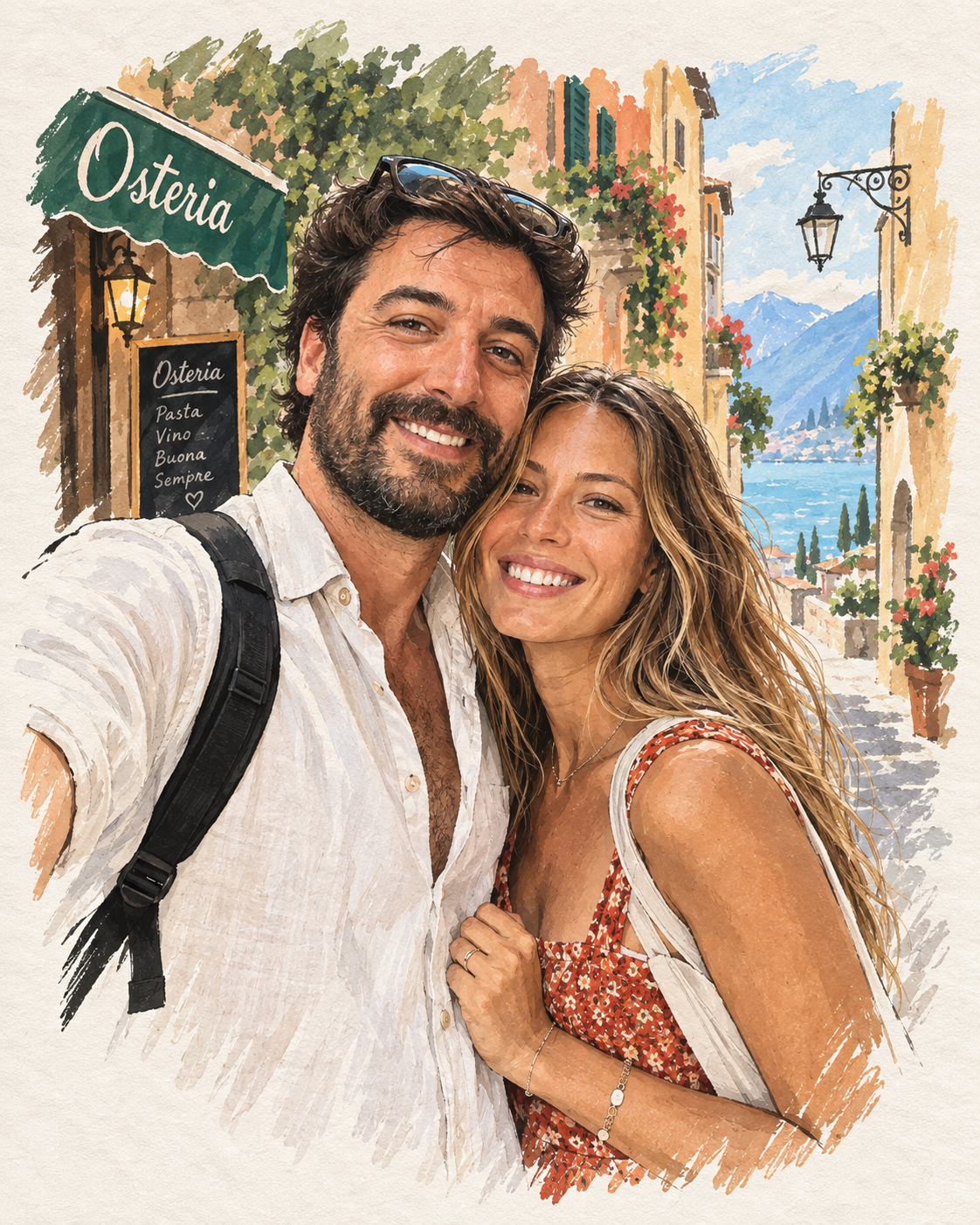
- Soft watercolor illustration with delicate thin ink line art, anime-inspired realism, highly detailed and realistic rendering, soft watercolor layers, visible watercolor paper texture, subtle pigment variation, gentle organic edges, and a handcrafted illustrated finish.
- Camera
- Choose the most suitable camera angle for {{POSE}}. Use a portrait composition with a 4:5 aspect ratio, naturally balanced framing, anatomically coherent perspective, and a softly focused background that supports the subject without distracting from her.
- Lighting
- Natural ambient lighting selected to complement {{POSE}} and the new environment. Use soft transitions, delicate watercolor shadows, harmonious highlights, and consistent illumination across the face, hair, neck, body, clothing, and surroundings.
Composition and wardrobe
- People Count Label
- one uploaded reference person
- People Count
- single
- Reference Instruction
- Use one uploaded reference woman as the main and only subject. Build the entire composition around {{POSE}}. Automatically generate the environment, outfit, lighting, camera angle, framing, gaze direction, head position, facial expression, hair movement, and visual storytelling so they naturally…
- Wardrobe · Instruction
- Automatically generate a completely new outfit that naturally complements {{POSE}}, the newly created location, the warm nostalgic atmosphere, and the watercolor illustration style. The clothing must follow the body position realistically, with believable folds, gravity, movement, layering, and m…
Recommended workflow
- 01
Prepare the input
Choose reference images you have permission to use. For Watercolour illustration, prioritize a clear subject and avoid unrelated people or private details in the frame.
- 02
Lock the visual plan
Confirm subject count, framing, scene, and lighting before adding finishing language. Resolve conflicts such as close-up versus full-body composition.
- 03
Adapt for one model
Start with ChatGPT Image. Keep a baseline generation and document the exact model version, references, aspect ratio, and visible settings.
- 04
Revise from evidence
Name the visible failure, change one instruction block, and compare it against the baseline. Keep only revisions that improve the intended criterion.
Model adaptation notes
ChatGPT Image
Keep the JSON structure, attach references in the same conversation, and use follow-up edits for one local correction at a time.
A compatibility label means the visual intent can be adapted; it does not promise identical output across providers, versions, or settings.
Prompt-specific quality checklist
- Selected pose input: {{POSE}}.
- Use thin, delicate ink outlines throughout the illustration.
- Build the artwork with soft, translucent watercolor layers and naturally overlapping pigment washes.
- Preserve a visible but refined watercolor paper texture.
- Use highly detailed, realistic rendering within the anime-inspired watercolor aesthetic.
- Use a warm palette dominated by beige, olive, cream, brown, and soft pastel tones.
- Keep the background softly focused while retaining enough illustrated environmental detail to establish the new location.
Failures to check before publishing
- text
- watermark
- signature
- logo
- low quality
- blurry face
- deformed hands
Why the editable controls matter
Gender
Required identity direction for the reference subject.
People count
Default is a single uploaded reference person.
Lighting
Changes Prompt.Style.Lighting without requiring a full prompt rewrite.
Background
Changes Prompt.Scene.Background without requiring a full prompt rewrite.
Mood
Changes Prompt.Style.Mood without requiring a full prompt rewrite.
Outfit style
Changes Prompt.Outfit.Style without requiring a full prompt rewrite.
Color palette
Changes Prompt.Style.Color Mood without requiring a full prompt rewrite.
Shot size
Changes Prompt.Composition.Shot Type without requiring a full prompt rewrite.
Identity or subject drift
Reduce competing style language, improve the reference, and separate stable traits from pose, gaze, and expression.
Composition breaks
Check whether crop, shot distance, aspect ratio, subject count, and required objects can all be satisfied in one frame.
Artificial lighting or texture
Name a motivated light source and believable material behavior before adding grain, grading, sharpness, or resolution terms.
 @cankirkgoz
Comments
Share the result you got, attach an image, and reply to other people's results.
You need to sign in to comment.